

We have made logging in, updating your details, and uploading your work easy and seamless, so you can complete the process comfortably from home. Follow the steps below to access your membership account and ensure your works are ready for upcoming distributions.
Step 1: Prepare Your Documents
Before logging in, ensure you have the following in soft copy:
- National ID (front and back)
- KRA PIN Certificate
- Passport Photo (white background)
- Next of Kin ID or Birth Certificate
- All your works (MP3 for music and MP4 for audiovisual content)
Step 2: Visit the Membership Page
- Go to Membership
- Head to the Membership Portal section.
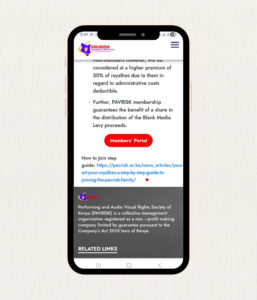
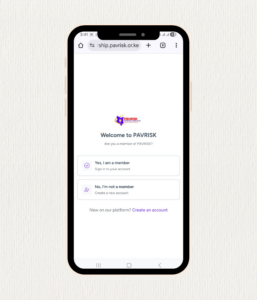
- When prompted, confirm that you are a PAVRISK Member.
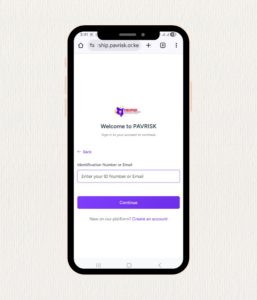
Step 3: Enter Your Login Details
- Input your ID Number.
- If you receive a message saying “User cannot be found,” enter your KRA PIN Number
Step 4: Email Security Confirmation
- After successful login, you will be required to provide the email address you use and can access for security confirmation.
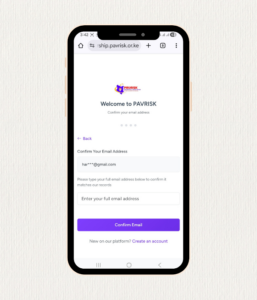
- If you cannot remember the email used, call 0781 721 721 and you will be assisted.
Step 5: Accept Declarations
- Agree to the PAVRISK Declaration Deed and Privacy Policy to proceed.
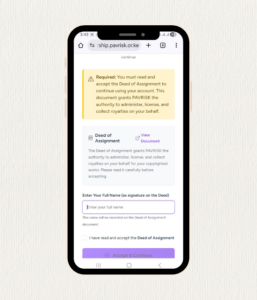
Step 6: Upload Required Documents
Upload the following:
- ID (front and back)
- KRA PIN Certificate
- Passport Photo (white background)
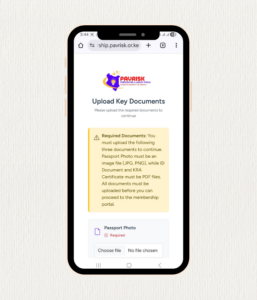
Once uploaded successfully, you will be directed to your Member Dashboard.
Step 7: Confirm Personal Details
- Review your Personal Details on the dashboard.
- Ensure all information is accurate and updated.
Step 8: Upload Your Works
To upload your music or audiovisual content:
Uploading MP3 (Music Rights)
- Go to Add Content on the Member Dashboard.
- Select Add Content → Choose Music Rights.
- Enter recording date and release date.
- Upload your MP3 file.
- Clearly input the Song Title.
- Under Contributors, enter:
- Your name as Main Artist
- The role you played in creating the song
- Click Add.
Uploading MP4 (Audiovisual Rights)
- Go to Add Content → Choose Audiovisual Rights.
- Enter recording date and release date.
- Upload your MP4 file.
- Clearly input the Film/Series Title.
- Under Contributors, enter:
- Your name as Main Artist
- Your role in creating the film/series
- Click Add.
Ensure you upload all your songs and works to be eligible for the upcoming April Distribution.
Need Assistance?
If you experience any challenges:
📞 0781 721 721 / 0732 721 721 (WhatsApp Enabled)